News On 6 Weather
- 4.1
- Rating
- 100.00K
- Installs
- Free
- Price

 Analysis by App-foxy
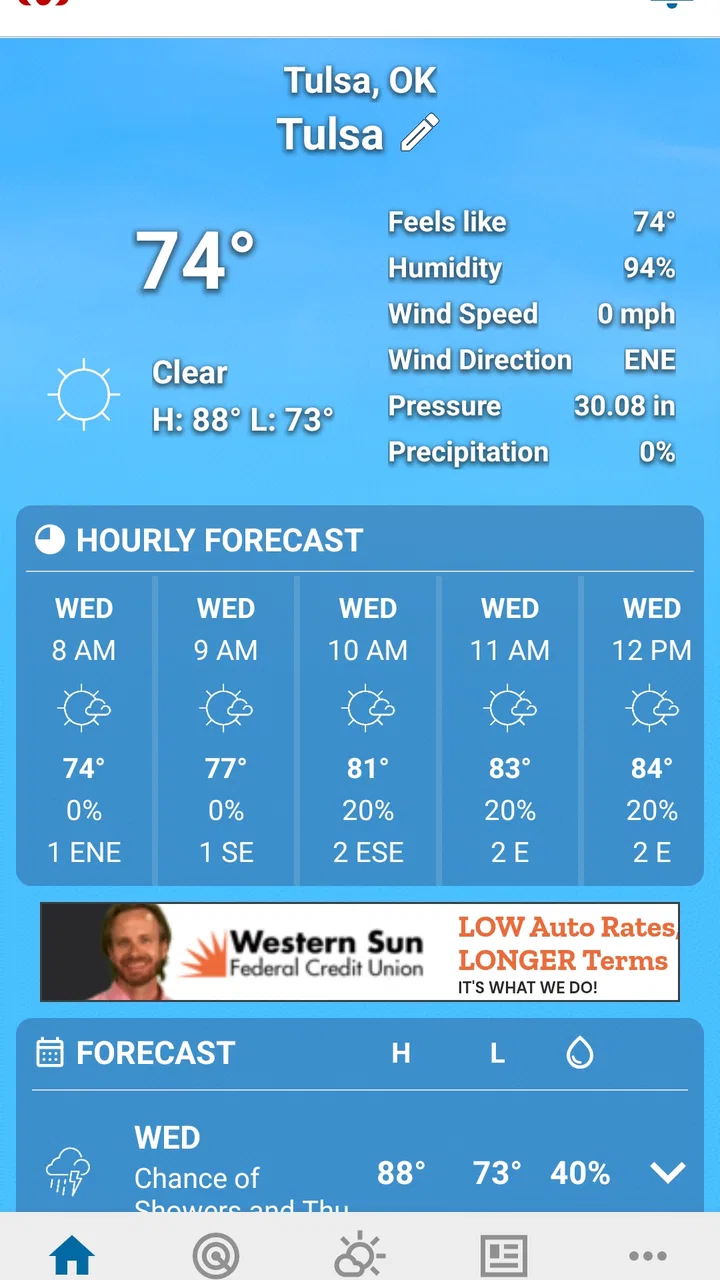
I approach weather apps with a little caution because a forecast is only useful when I can understand where it comes from, what it is asking me to allow, and how much confidence I should place in it. News On 6 Weather is a free weather app from Griffin Media, L.L.C. built around the News On 6 brand and custom forecasts from Travis Meyer. After spending time with it, I see it as a practical choice for people who want local weather information presented in a familiar news-style setting rather than a huge collection of global weather tools.
The app has been available since May 21, 2013, and its current version is 6.7.1.1304 for devices running Android 6.0 or later. Its Everyone rating makes it suitable for general household use, including checking conditions with children or older relatives. It has passed 100K+ installs and holds a 4.1 average from around 2K ratings, with more than 600 written reviews. Those figures suggest a reasonably established audience, although they do not replace my own judgment about whether its approach fits your routine.
How News On 6 Weather earns trust—and where I stay careful
The strongest trust signal here is the app’s clear identity. It is not presented as an anonymous forecast utility; it is connected to News On 6 and specifically highlights custom forecasts from Travis Meyer. That gives the experience a local-news character. I find that useful when I want a forecast explained in a way that feels connected to the area, rather than simply reading a row of temperature icons with no context.
You May Also Like

 Blood Strike: 2.5 Anniversary
Blood Strike’s Loadouts Turn Every Drop Into a Tactical Gamble
A close look at Blood Strike’s custom loadouts: how fast access to signature weapons reshapes its battle royale rhythm, rewards preparation, and narrows the gap between fights.

 Pandora - Music & Podcasts
Pandora’s Music Is Easy to Start, but Harder to Recover
Pandora’s strength is its low-effort path from a seed to a station. Its weak spot is how much confidence it asks you to place in connection, setup, and quiet recovery.

 8 Ball Pool
 Is Built on Rivalries, Rematches, and Routine
A close look at the rivalries, rematches, shared routines, and unanswered safety questions that turn a quick pool match into a persistent mobile community.

 Samsung Music
’s Quiet Strength Is Playing What You Already Own
Its reach comes less from spectacle than from dependable access to a personal library. That simplicity is both the app’s strongest retention engine and its ceiling.

 AccuWeather: Weather Radar
AccuWeather Review: A Quick, Clear Forecast for Everyday Decisions
For everyday plans, the best forecast is the one you can understand quickly. AccuWeather makes rain timing, radar, and local conditions easy to act on, with a few trade-offs.

 Hill Climb Racing
Why Hill Climb Racing Still Turns Crashes Into One More Run
A tiny car, a bumpy hill and one more upgrade: Hill Climb Racing keeps resurfacing because its simple chaos makes every near-miss feel personal.
More From Our News Desk
View All News


That local connection also creates a reasonable expectation: this is best approached as a regional weather companion, not as a universal replacement for every specialized weather service. If I were planning a trip across several countries, comparing conditions in distant cities, or studying detailed meteorological information, I would want a broader tool alongside it. For ordinary decisions such as whether to leave early, carry an umbrella, protect outdoor plans, or check the evening outlook, its focused identity is more appealing.
I also appreciate that the app is free. There is no purchase decision standing between opening it and checking the forecast, which makes it easy to recommend as a first weather app for a family member. At the same time, “free” should not automatically be read as “private” or “without trade-offs.” The right way to use any weather app is to review the permissions and privacy choices shown on your own device and in the app’s current settings before granting access.
That point matters because weather applications often work best when they know which place you care about. A user may be tempted to approve location access immediately, especially during a storm or while rushing out the door. I prefer to pause and ask whether automatic location is genuinely useful for my routine. If I mainly check one home location, manually selecting that place can be a more deliberate choice when the app offers it. I would not grant location access simply because the request appears during setup.
What I would check before making it part of my routine
My first step with News On 6 Weather would be to read each permission prompt instead of tapping through it. Android’s permission screen is the most concrete place to see what the operating system is asking me to approve. I would pay particular attention to location access and whether the device offers a choice between limited, approximate, or one-time access. The exact options depend on the phone and Android version, so I would use the controls visible on my own device rather than assume every handset behaves identically.
I would also open the app’s system settings after installation and review its notifications. Weather alerts can be valuable, but not every notification is equally important. If the app lets me distinguish urgent warnings from routine updates, I would keep the safety-related notices and reduce anything that feels distracting. If the controls are less granular, I would choose the notification level that matches my needs instead of leaving every category enabled by default.
Another useful check is the Android privacy dashboard or permission manager. I use it to see whether an app has recently accessed sensitive permissions and to revoke access that no longer feels necessary. This is not a criticism unique to Griffin Media, L.L.C.; it is a sensible habit for any weather app. A forecast tool should fit into my privacy boundaries, not quietly define them for me.
I would make the same review after an update. The installed version is 6.7.1.1304, but permissions and system behavior can change as an app evolves or as Android changes around it. I do not assume that a permission granted months ago still reflects what I want today. Rechecking after a major update takes little time and gives me a clearer sense of control.
Location, alerts, and the moments when privacy matters most
The most data-sensitive moment is usually the first launch, when a weather app tries to make local forecasts convenient. News On 6 Weather may be most useful when it knows which area I care about, but convenience and necessity are not the same thing. If I am at home, I can often decide whether automatic location is worth it. If I am traveling, temporary access may be more appropriate than leaving continuous access enabled.
There is also a practical safety trade-off. During severe weather, a timely alert can matter more than the small inconvenience of a notification. I would keep alerts enabled if I live in an area where changing conditions affect driving, work, school, or outdoor safety. However, I would still review the phone’s notification permissions and battery settings so that the app is not unintentionally silenced. A privacy-conscious setup should not become a safety-blind setup.
I would avoid treating a weather alert as a guarantee. Even a well-presented local forecast can change, and an alert is a prompt to check conditions, not permission to ignore official emergency instructions. For serious weather, I would compare the app’s information with local authorities and other trusted channels. This is one of the clearest situations where using more than one source is sensible.
My everyday scenario is simple. Before leaving for work, I would open the app, check the current conditions and the forecast for the hours I will be outside, then decide whether I need a coat, rain gear, or extra travel time. If I am taking a child to an outdoor activity, I would check again closer to departure rather than relying on an early-morning glance. The app’s local-news orientation is useful in that routine because I want a readable summary, not an endless technical dashboard.
For a different scenario, such as a long road trip, I would use it as one checkpoint rather than my only source. I would compare the starting location, destination, and route with a broader mapping or weather service. That is not because the app fails at local checking; it is because travel creates a wider information problem than a single-location forecast can comfortably solve.
How I use the app without surrendering control
I prefer to establish a small, intentional routine instead of allowing a weather app to become background noise. I would begin with the location and notifications I actually need, then use the app manually for a few days. That lets me see whether the forecast presentation is helpful before I decide whether additional alerts or convenience settings deserve access.
If the app offers a way to save or select a location, I would choose the places that genuinely matter—home, work, or a regular school or activity location—rather than collecting a long list I will never check. A shorter list makes mistakes less likely, especially when two places have similar names. It also reduces the chance that I will glance at the wrong forecast while making a quick decision.
I would be especially careful with shared devices. A weather app can reveal routine locations through saved places, visible recent searches, or notifications on the lock screen, depending on the device and the app’s implementation. I would review what appears publicly when an alert arrives and use Android’s notification privacy settings if the phone is used by more than one person. This is a small but often overlooked part of user agency.
For children, I would keep the setup simple and avoid giving more access than necessary. The Everyone rating means the app is broadly suitable for general audiences, but an age rating does not answer every privacy question for a family. I would configure permissions myself, explain what the app is for, and avoid letting a child approve location or notification requests without understanding them.
On an older phone, the minimum Android requirement of 6.0 is helpful because it includes many devices that cannot run newer applications. Still, older operating systems may provide fewer modern privacy controls than recent Android releases. If I were using an older handset, I would be even more deliberate about reviewing permissions through the available system menus and keeping the app updated when updates are offered.
Where it fits beside other weather choices
Compared with a basic built-in weather widget, News On 6 Weather feels more intentional for someone who values a local news identity and custom forecasting. A widget is faster for a glance, but it may not provide the same sense of a regional weather source. I would choose the widget when speed matters most and this app when I want to spend a little longer understanding the outlook.
Compared with large national or international weather platforms, its appeal is narrower. Those alternatives may be better for comparing many locations, exploring maps, following travel conditions, or looking for highly specialized layers. News On 6 Weather makes more sense when my main question is local and immediate: what should I expect in the area I live in today?
It also differs from a browser search. Searching the web can be convenient when I need a quick answer without installing anything, but an installed app can make repeated checking more direct. The trade-off is that an app has its own permissions, notifications, and settings to manage. I would not install it merely to check the weather once; I would install it if the local-news presentation and recurring use justify that extra relationship with the device.
One non-obvious trade-off is that a focused local app can reduce clutter while also limiting perspective. I may get a clearer answer for my home area, but I should not assume it is the best tool for comparing several destinations or understanding a complicated travel route. Another is that custom forecasts can be easier to follow than raw data, yet users who enjoy radar layers, historical charts, or detailed atmospheric readings may find a specialist service more satisfying.
Who should use it, and who should look elsewhere
I would recommend News On 6 Weather to someone who wants a free, approachable local forecast app connected to News On 6 and Travis Meyer’s custom forecasts. It is particularly suitable for households that check weather before commuting, school runs, errands, outdoor plans, or local events. Its Everyone rating and established audience also make it an uncomplicated candidate for general family use, provided an adult reviews the setup.
I would be more hesitant to recommend it as the only weather tool for frequent travelers, outdoor professionals, pilots, sailors, or anyone who needs specialized meteorological detail. Those users should look for services designed around route planning, advanced maps, technical observations, or professional alerts. The app may still be useful for a local second opinion, but its value depends on whether its straightforward local focus matches the job.
I would also ask privacy-sensitive users to take an extra minute during setup. If you dislike location access, do not want alerts, or prefer not to maintain another app account or permission relationship, a manually checked browser service or a simple device widget may suit you better. The best choice is not the app with the most features; it is the one whose access and notification behavior you are comfortable managing.
My cautious verdict after using it
News On 6 Weather is a sensible free weather app when local familiarity matters more than a deep toolbox. I like the connection to News On 6 and the emphasis on custom forecasts from Travis Meyer because it gives the app a recognizable voice instead of making it feel like a generic collection of numbers. The 4.1 average from around 2K ratings and 100K+ installs show that it has found a meaningful audience, though I still recommend judging it against your own location and habits.
My approval comes with a clear condition: I would install it, review every permission, keep only useful notifications, and treat location access as a choice rather than an automatic requirement. I would also use an additional source during serious weather or travel. The best way to trust this app is to keep the forecast convenient while keeping the controls deliberate.
For a local resident who wants a familiar daily check, that balance is easy to achieve, and I can see myself recommending it to a friend with that use case. For someone seeking worldwide coverage, technical weather analysis, or a completely permission-free experience, I would point elsewhere. In the right setting, News On 6 Weather is a practical companion—not because it tries to do everything, but because its local focus can make everyday decisions quicker and easier when configured with care.
FAQs for News On 6 Weather
01What features does the News On 6 Weather app offer?
The News On 6 Weather app provides real-time weather updates, including current conditions, hourly and weekly forecasts, and severe weather alerts. It features interactive radar maps, video forecasts, and personalized notifications to keep you informed about weather changes. The app also offers a user-friendly interface for easy navigation.
02Is the News On 6 Weather app available for both Android and iOS devices?
Yes, the News On 6 Weather app is available for download on both Android and iOS platforms. You can find it in the Google Play Store for Android devices and the Apple App Store for iOS devices, ensuring compatibility with a wide range of smartphones and tablets.
03Does the News On 6 Weather app require a subscription or in-app purchases?
The News On 6 Weather app is free to download and use. While the app does not require a subscription, it may offer optional in-app purchases for additional features or an ad-free experience. Users can enjoy comprehensive weather information without any mandatory costs.
04How accurate is the weather information provided by the app?
The News On 6 Weather app leverages advanced meteorological data and technology to provide accurate weather forecasts. It sources information from reliable weather services and employs local meteorologists to ensure precision. However, like all weather apps, minor discrepancies may occur due to rapidly changing conditions.
05Can I customize notifications in the News On 6 Weather app?
Yes, the News On 6 Weather app allows you to customize notifications to suit your preferences. You can set alerts for severe weather warnings, daily forecasts, and specific weather conditions. This feature ensures you stay informed about weather changes that are important to you.
Pros
- Accurate weather forecasts and updates.
- User-friendly interface with easy navigation.
- Customizable alerts for severe weather.
- Detailed radar and satellite imagery.
- Local and regional weather news coverage.
Cons
- Limited features for international users.
- Occasional ads may interrupt use.
- Requires internet for full functionality.
- No offline mode for weather updates.
- Battery consumption can be high.

News On 6 Weather
Gallery